

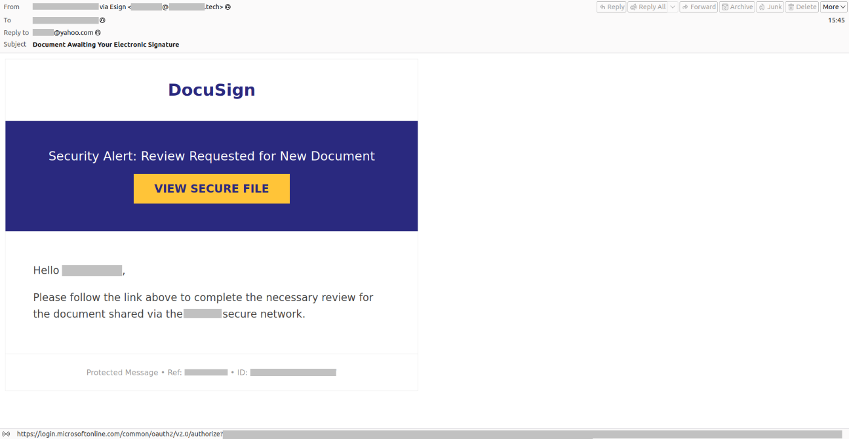
Kaspersky experts have identified a scam email campaign. Attackers send emails with legitimate Microsoft service links to redirect users to fraudulent sites or trick them into downloading malware. From August 1 to September 18, 2026, more than 31,000 emails with such links were blocked by Kaspersky solutions.
Earlier this year, Kaspersky reported detecting a phishing campaign where attackers abused Microsoft’s authentication mechanism. Now Kaspersky experts explain how cybercriminals are exploiting the same technology with different bait: attackers sent victims emails disguised as official Microsoft communications, urging them to follow the link to keep their service credentials updated or to sign electronic documents.
HOW THE REDIRECT TRICK WORKS
To set up the redirect, attackers first create a Microsoft account and log into the Microsoft Entra admin center. In the application-registration section, the fraudsters create a new application. When registering the application, the service lets you specify a redirect URI (Uniform Resource Identifier), the address to which the Microsoft Entra authentication server sends the user after successful authorization. In this field, the attackers add a link to their malicious site.
Then the fraudsters send messages with Microsoft redirect links that include the registered app’s Application ID and the specified redirect URI. When users click the link, they land on a resource designed to steal personal data or download malicious software.
HIJACKING MICROSOFT’S OWN NOTIFICATIONS
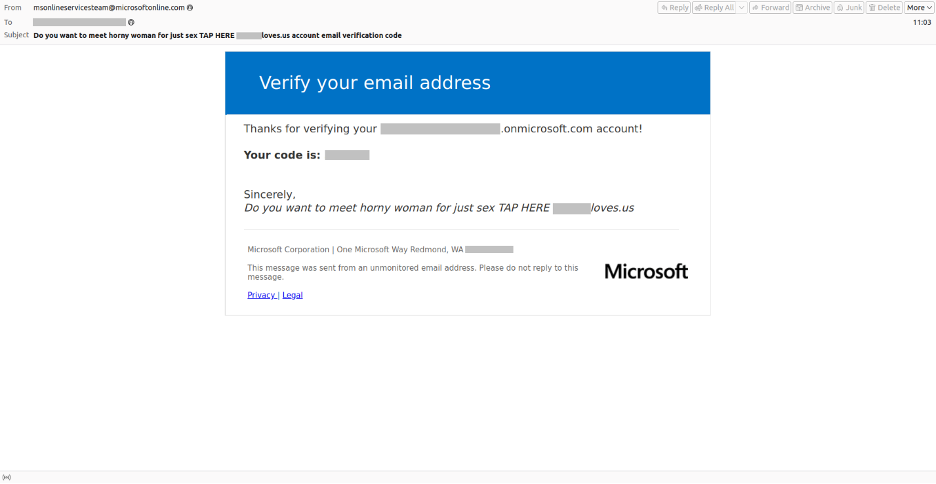
Using the Microsoft Entra admin center, attackers also found a way to embed malicious content in the service’s legitimate notifications. Most likely, they have to purchase the cheapest license or start a trial period.
Spammers put a fake message in the name field on the Overview page, then create bogus users in the Users section with made-up email addresses, display names, and passwords. Then attackers log into the Microsoft My Account portal with the new credentials for the bogus user and add the victim’s real email address as a backup mailbox (used for password-reset messages).
As a result, the victim receives an unsolicited verification code, and the scammers’ fraudulent message appears in the email’s subject and signature.
WHY IT IS HARD TO SPOT
“It’s not the first time we have observed that fraudulent links and messages are not sent ostensibly on behalf of the real company, but are sent through official services. This adds a dangerous layer of credibility, making the scam harder to spot. Traditional phishing cues don’t apply well, so detecting it on your own is difficult. We strongly advise users to deploy a security solution with a robust anti-phishing component, ensuring automatic protection even against the most sophisticated phishing attacks,” said Andrey Kovtun, email threats protection group manager at Kaspersky.
HOW TO STAY PROTECTED
To build a comprehensive defense against these threats, organizations should consider robust email security solutions. For corporate users, Kaspersky Security for Mail Server delivers robust protection against a wide range of advanced mail-borne threats. Powered by machine learning algorithms, its multi-layered defense mechanisms offer businesses peace of mind in the face of evolving cyber risks.
For individual users, Kaspersky Premium offers anti-phishing features designed to help avoid phishing attacks and improve overall cybersecurity. To ensure advanced protection against increasingly complex cyber threats, Kaspersky actively amplifies its consumer solutions with AI-powered scam protection, a unified suite of technologies that combines machine learning-based anti-phishing algorithms, real-time behavior monitoring, and Data Leak and Identity Theft checkers.