
The update introduces new Galaxy AI features for video, daily summaries, translation, scanning, device care, security, and privacy.
Samsung has started the wider rollout of One UI 9, beginning with the Galaxy S26, S26+, and S26 Ultra on September 16.
The software previously debuted on the Galaxy Z Fold8 Ultra, Z Fold8, and Z Flip8, and will gradually expand to additional compatible Galaxy devices. One UI 9 builds on Samsung’s existing Galaxy AI features with new tools designed around content creation, productivity, personalization, device support, security, and privacy.
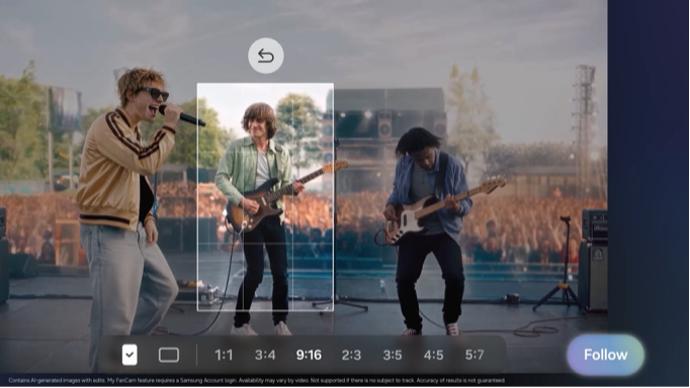
My FanCam keeps subjects in focus
One of the new creative tools is My FanCam, which can automatically track a selected person in a recorded video and keep that subject centered as the scene moves.
The feature intelligently reframes footage to reduce the amount of manual cropping and editing needed when creating short-form or social content. It can be used for situations such as performances, sporting events, or other recordings where the user wants to follow a specific person throughout the clip.
My FanCam requires a Samsung Account, and its availability and accuracy can vary depending on the video.
More control over Now Brief
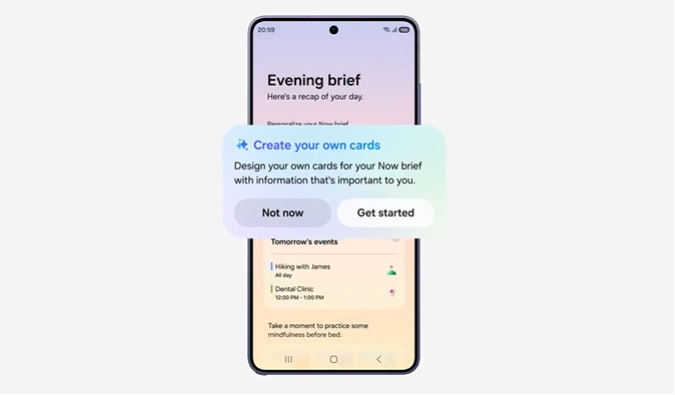
One UI 9 also introduces Generative and Editable Cards for Now Brief.
Users can create cards covering areas such as health, weather, and video, allowing their daily summaries to focus more closely on information they consider useful.
Samsung is also bringing Warranty and Care directly into the Settings menu. From there, users can check warranty coverage for connected devices, run self-diagnostics, view available repair estimates, manage Samsung Care+, and book service appointments where supported.
Context-aware suggestions with Now Nudge
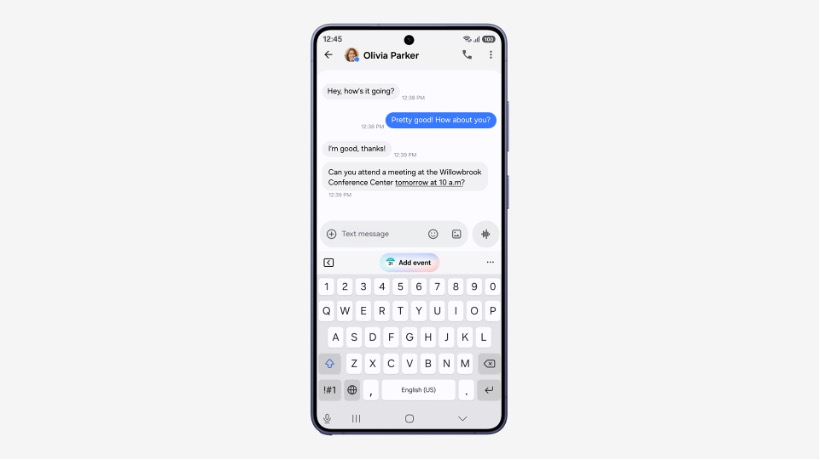
Now Nudge extends Galaxy’s context-aware suggestions into more parts of the interface.
For example, when users are making plans through a text conversation, the feature can surface relevant reservation information or allow them to save a shared location without leaving the conversation.
Creative Studio can also suggest image-generation ideas based on upcoming events, such as creating a birthday image or greeting when a friend’s birthday is approaching.
Better translation, scanning, and recording
Interpreter gains a new Thread View, allowing users to look back at earlier exchanges in a translated conversation.
Conversation Mode also receives faster translation, while compatible Galaxy Buds can provide quicker playback to reduce pauses during live exchanges. Availability, supported languages, and accuracy vary by market and device.
Document Scan is being updated to better handle difficult materials such as curved book pages and folded paper corners, while an improved Finger Eraser can help clean up scanned documents. On compatible large-screen Galaxy devices, the interface is also optimized to make scanned material easier to review.
Voice Recorder meanwhile presents summaries in a more structured form, using elements such as headings and tables to make key information easier to review.
Security updates move into Now Brief
One UI 9 also adds more security and privacy information directly into the everyday interface.
Security Brief can surface alerts involving malware, applications installed from unknown sources, and unnecessary permissions through Now Brief, giving users a clearer indication when a security issue may require attention.
Privacy Alerts use on-device AI to identify possible privacy risks, including unnecessary attempts by apps to access permissions in the background. This feature is supported on a specified range of recent Galaxy S, Z, and Tab devices.
Samsung is also expanding Scam Detection to additional markets and languages, with availability varying by device, country, region, language, and software version. The release lists Japan, Canada, and India among the additional supported markets.
One UI 9 will continue rolling out gradually to additional compatible Galaxy devices.