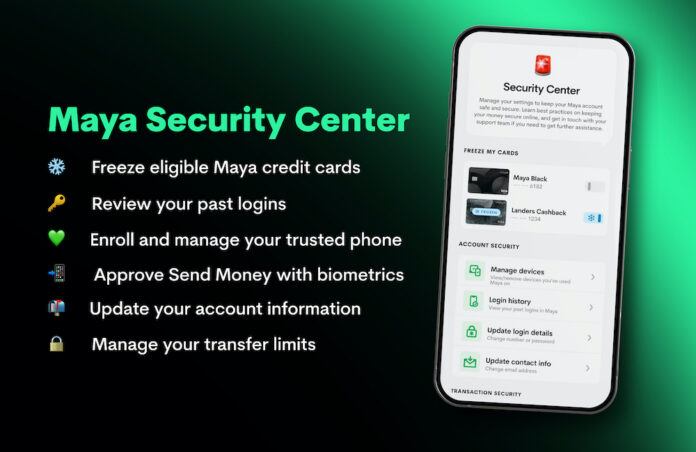

Maya is expanding the security tools available inside its app, giving customers more direct control over account access, transactions, trusted devices, and eligible credit cards.
Introduced late last year, Security Center brings several existing safeguards together in one area of the Maya app while adding features designed to make account protection easier to manage. These include trusted-phone enrollment, biometric approval for Send Money, login history, transfer limits, and card controls.
TRUSTED PHONES ADD BIOMETRIC APPROVAL
Customers with upgraded Maya accounts can enroll trusted phones through Security Center, accessible through the Profile or Services sections of the app. They can also complete enrollment through the prompt displayed after logging in.
Once a phone has been enrolled and passes Maya’s security checks, customers can use Face ID or fingerprint authentication instead of an SMS one-time password to approve Send Money transactions.
“Protecting our customers’ money requires continuing investment in infrastructure, safeguards, monitoring and incident response. It also means giving customers clear ways to manage their account security and reach us when they need help,” said Shailesh Baidwan, Maya Group president and Maya Bank co-founder.
“Our in-app Security Center brings practical controls together in one place, making them easier to find and use.”
REVIEW LOGINS AND MANAGE TRUSTED DEVICES
Under Account Security, users can view devices enrolled as trusted phones and remove those they no longer recognize or use.
Login History provides a record of previous account logins, giving customers another way to check for activity that may require attention.
Users can also change their registered mobile number or password and update the email address associated with their account.
FREEZE ELIGIBLE CREDIT CARDS IN THE APP
Security Center includes a Freeze My Cards function for Maya Black and Landers Cashback Everywhere credit cardholders.
The control allows eligible users to freeze their credit card directly through the Maya app, providing an immediate option if a card is misplaced or the user notices activity that requires further checking.
CUSTOMERS CAN SET TRANSFER LIMITS
Transfer Limits gives users additional control over selected money movements.
Customers can manage limits for InstaPay transfers from Maya Wallet to other banks, as well as Insta-fill transfers from Maya Savings into Maya Wallet.
These controls allow users to adjust transaction limits according to their own usage and security preferences.
FRAUD MONITORING WORKS IN THE BACKGROUND
The customer-facing tools sit alongside Maya’s broader safeguards, including AI-supported fraud monitoring.
Maya Philippines and Maya Bank hold ISO 27001 certifications for information security management and ISO 27701 certifications for privacy information management. The certifications have been held continuously since 2022 and 2023, respectively.
Security Center therefore gives customers more visible control over their own accounts while other monitoring and information-security measures continue behind the scenes.
SCAM AWARENESS REMAINS PART OF THE APPROACH
Maya also runs ScamPatrol, an awareness program focused on helping customers recognize common fraud tactics, suspicious messages, and requests for sensitive information.
The program complements technical security controls by encouraging users to identify potential scams before they act on fraudulent instructions.
Maya also works with the Bangko Sentral ng Pilipinas, Cybercrime Investigation and Coordinating Center, Department of Justice, and Philippine National Police on efforts addressing online scams and cyber fraud.
Its work includes support for the CICC’s Scam Safe initiative, which focuses on strengthening public awareness.
“We work with government and industry partners to combat financial scams and strengthen customer protection,” Baidwan said. “That cooperation goes hand in hand with our responsibility to keep improving Maya’s safeguards and helping customers use financial services with confidence.”
PUTTING MORE SECURITY IN THE USER’S HANDS
Security Center reflects a broader shift toward giving customers more control over how their digital financial accounts are accessed and used.
Instead of security operating only in the background, functions such as trusted-device management, biometric transaction approval, login monitoring, card freezing, and transfer limits give users tools they can actively manage themselves.
More information about Maya’s services is available through the Maya website and Maya Bank website.