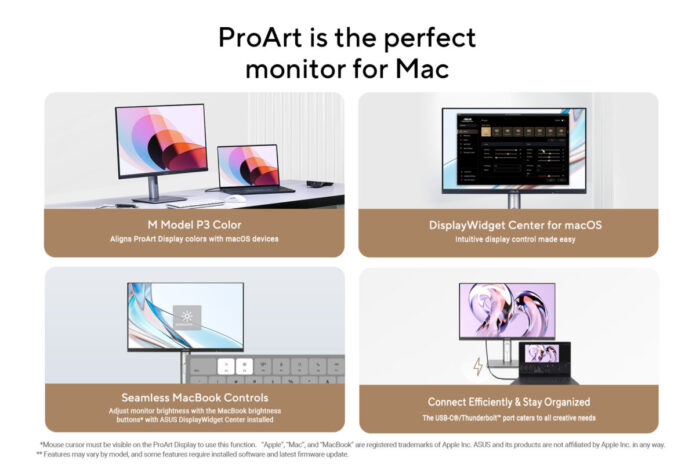

ASUS has announced new features on ProArt displays to enhance productivity and creative workflows for MacBook, Mac Mini, and Mac Studio users. ASUS DisplayWidget Center software for macOS provides an intuitive interface that allows users to easily adjust monitor settings, including brightness, contrast, and color temperature. ASUS DisplayWidget Center also lets users adjust display brightness directly via the MacBook shortcut buttons. Plus, new M Model P3 color settings align monitor colors with MacBook for consistent color accuracy.
High-resolution, high-pixel-per-inch ProArt displays let users fully experience the exceptional graphics performance of the latest Mac devices. And with up to Delta E<1 color accuracy and a wide 99% DCI-P3 gamut, every detail comes to life, enhancing the quality of work and efficiency of creative workflows.
Select ProArt displays feature a variable refresh rate up to 240Hz for perfectly synced visuals on Mac devices with Apple ProMotion technology. Each ProArt display is tested by reputable third-party labs to ensure broad compatibility with MacBook Pro, Mac mini, and Mac Studio.
Built-in USB-C/Thunderbolt 4 connectivity enables superfast data transfers, DisplayPort compatibility, and up to 96W Power Delivery to charge MacBooks and other devices ― all via a single cable.
Perfect for Mac
The intuitive ASUS DisplayWidget Center software for macOS enables users to easily adjust monitor settings, including brightness, contrast, and color temperature, to enhance viewing experiences. The app also allows users to use their MacBook’s shortcut keys to adjust the brightness of the ProArt display.
The new M Model P3 color setting is designed to match the color performance of the ProArt display and the connected MacBook, ensuring perfect consistency across both screens. This is ideal for color-critical tasks such as photo editing, video production, and graphic design.
True-to-life hues and precise color management
Color professionals rely on color-accurate displays to ensure that their creations look exactly as intended. Each ProArt display is factory-calibrated to meet Calman Verified standards and to achieve up to Delta E<1 color accuracy.
ProArt Calibration software supports both SDR and HDR modes and works on macOS. Hardware calibration saves all color profiles directly to the ProArt monitor’s internal scaler chip rather than the PC. ProArt Calibration software can also generate ICC profiles not only for ProArt displays but also for a wide range of monitors and MacBook screens, ensuring consistent, reliable color performance. Users can also schedule regular calibrations with the ProArt Calibration software, which is compatible with most major calibrators, including ProArt CaliContrO MCA02, X-Rite, Calibrite, Datacolor, Klein, and Colorimetry Research.
ProArt Color Center is an online tool designed to help administrators manage color accuracy across multiple ProArt displays that support hardware calibration. Users can check when the monitors were last calibrated, next recommended calibration date, and schedule calibration times for multiple monitors ― even if they’re using different color parameters and/or situated in different locations.
ProArt Display seamlessly integrates with third-party professional hardware calibration software, including Calman and Light Illusion ColourSpace CMS. It also supports writing color parameters back into the ProArt displays, making the calibration process faster and easier.
A powerful connectivity hub
ProArt displays offer a myriad of connectivity options, including USB-C, HDMI, and DisplayPort (with daisy-chain support). For convenience, the monitor can also serve as a USB hub, allowing devices connected to its USB ports to access other peripherals, eliminating the need for a docking station. In addition, built-in Auto KVM allows for effortless switching, control, and multitasking between two connected MacBooks or PCs with a single keyboard and mouse connected to the display’s USB hub.
Designed for all-day viewing
Each ProArt display features an ergonomic stand that enables effortless tilt, swivel and height adjustments for comfortable viewing. A quick-release feature makes it easy to attach the display to its integrated VESA wall mount—no screws required.
The TÜV Rheinland-certified Flicker-free and Low Blue Light technologies ensure comfortable viewing experiences. Flicker-Free technology reduces onscreen flicker to help minimize potential eye strain or eye fatigue, even when spending long hours in front of the display. In addition, the Blue Light Filter protects eyes from harmful blue light. It can be easily activated and includes a 0-100% adjustment slider within the OSD menu.
Free Adobe Creative Cloud subscription
ASUS has partnered with Adobe to empower creative workflows with the renowned Creative Cloud suite of apps and services. Every purchase of a ProArt Display in select regions includes a free three-month subscription to Adobe Creative Cloud plans until August 31, 2026. For full details, visit https://www.asus.com/content/asus-offers-adobe-creative-cloud.