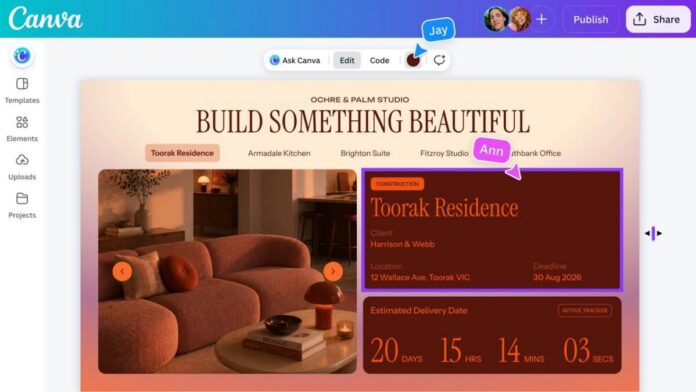

Canva has rolled out Canva Code 2.0 in the Philippines, expanding its AI-powered creation tools for users who want to build websites, apps, games, classroom materials, and other interactive experiences without traditional coding.
The updated platform allows users to generate an experience through a plain-language prompt and then edit the result directly within Canva. Text, fonts, colors, layouts, and images can be adjusted through the familiar visual editor rather than through code or repeated prompts.
Users can also begin with one of more than 50 templates or import existing HTML created through another AI tool.
From prompts to interactive experiences
Canva Code is designed around “vibe coding,” an approach in which users describe what they want in everyday language and allow an AI system to generate a working website, application, or interactive experience.
Canva says many existing AI coding tools can produce functional prototypes but provide limited visual control. Customizing the output may require additional design software, development support, or repeated instructions.
Canva Code 2.0 addresses this by bringing generated experiences into Canva’s visual editor. Users can update content and layouts, replace assets using images from Canva’s media library or their own uploads, and refine individual elements through conversational AI.
This allows the output to be treated more like a regular Canva design instead of a fixed block of generated code.
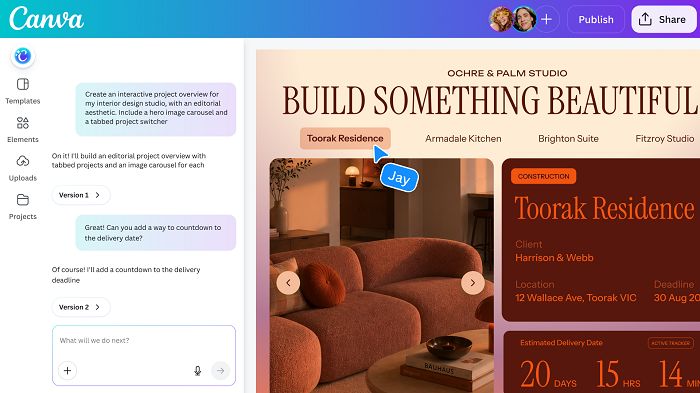
HTML import and on-canvas editing
One of the update’s key additions is the ability to import HTML created through other AI assistants.
Rather than rebuilding a project from the beginning, users can bring the existing HTML into Canva and continue editing it within the platform. Generated experiences can also be added to presentations, whiteboards, and other Canva projects. This lets users combine interactive content with their existing visual materials and collaborative workflows.
Canva says projects created through Canva Code are automatically responsive across devices.
Faster generation and publishing
Canva reports that average code-generation time has been reduced by 75% to approximately 45 seconds.
The company also says the median time required to publish a site has fallen by 30%, while the number of active Canva Code users has increased by 25% since the recent update. These are company-reported platform figures and were not accompanied by the underlying measurement period, sample size, or methodology in the release.
Canva also says its AI products have been used more than 32 billion times globally, with usage tripling over the past year. More than six million websites have reportedly been created and published through Canva Code within one year.
Collaboration and publishing options
Teams can build, review, and refine Canva Code projects together in real time. Completed experiences may be published to a custom domain or shared through Single Sign-On, depending on the user’s account and available features.
Canva Code can also connect with Canva Sheets, allowing creators to collect and manage information within the same workflow. The availability of custom domains, Single Sign-On, and other publishing or administrative functions may vary by subscription plan.
Applications in education
Canva says educators and school administrators in the Philippines are using Canva Code to create classroom hubs, interactive lessons, and learning materials. These tools can be used to present complex topics in a more engaging format or update materials as curriculum requirements change. The company also cited a project in Spain in which 50 educators created interactive learning games aligned with pedagogical goals for World Book Day.
Tools for entrepreneurs and small businesses
Entrepreneurs and small businesses can use Canva Code to create marketing sites, planning tools, fundraising resources, and community-engagement platforms without writing code manually.
For smaller organizations, combining generation, design, collaboration, and publishing in one platform may reduce the need to move between several applications during the creation process.
However, users should still assess whether a generated project meets their requirements for security, accessibility, data privacy, payment processing, reliability, and long-term maintenance before using it for critical business functions.
Availability in the Philippines
Canva Code 2.0 is now available globally, including in the Philippines. It is accessible to Canva Free, Pro, Business, Enterprise, and Education accounts, although individual features, usage limits, administrative controls, and publishing options may differ by plan. The rollout broadens Canva’s role beyond traditional graphic design by giving users a visual way to create interactive digital experiences through AI-generated code.
In Summary
Canva Code 2.0 is now available to users in the Philippines across Canva Free, Pro, Business, Enterprise, and Education accounts.
The update allows users to generate websites, apps, games, lessons, and other interactive experiences through plain-language prompts. They can then edit the output directly on the Canva canvas, replace assets, import HTML from other AI tools, collaborate in real time, and publish the result.
Canva reports faster generation and publishing times, growing use of the platform, and applications across education, entrepreneurship, and small-business marketing. Some publishing, collaboration, and administrative features may depend on the user’s Canva plan.